MicroPython OTA Updates from GitHub on ESP32
- micropython
- esp32
- ota-updates
- github
- embedded-systems
- iot
- python
A MicroPython device does not need to come back to a desk every time its application changes. My MicroPython OTA updater fork lets an ESP32 check a configured GitHub branch at boot, compare the branch HEAD with the commit SHA already installed on the device, and stage a new Python application when those values differ.
This is an application-file updater. It replaces the Python files inside the device's managed src directory; it does not rewrite the MicroPython firmware image over the air. Firmware installation remains a separate, host-driven operation.
Quick orientation
Start with the boundary and the boot-time path: what changes on the device, what stays fixed, and how a revision becomes eligible to run.
The updater follows a guarded handoff: GitHub identifies the target, the ESP32 stages it beside the running application, and confirmation decides whether the new copy stays.
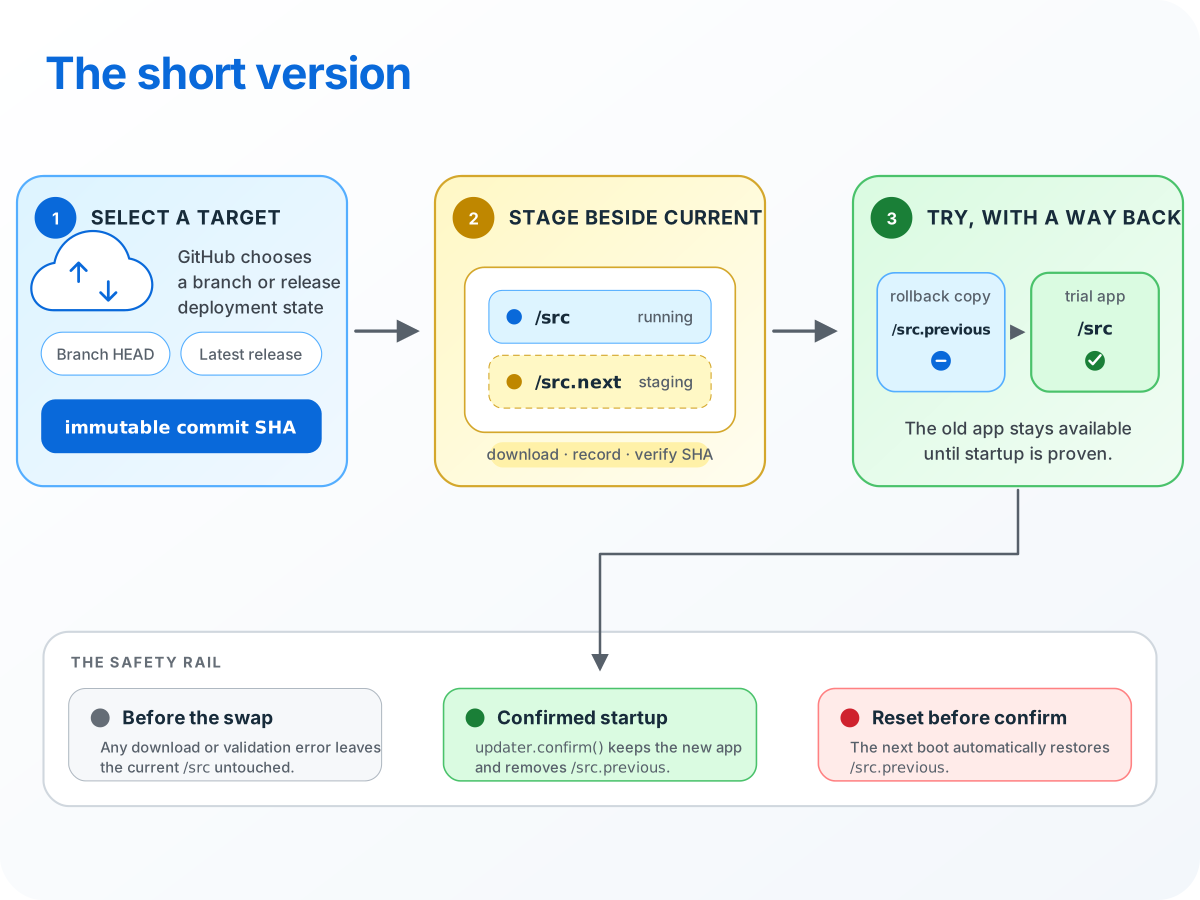
If downloading or staging fails, the current application stays in place. If the device resets before the new application confirms a successful start, the next boot restores src.previous.
That is the core of the fork: GitHub provides the deployment state, a commit SHA identifies it, and a confirmation handshake decides when the previous application is safe to remove.
Application OTA is not firmware OTA
There are two separate layers on the device:
- MicroPython firmware provides the interpreter, board support, filesystem, networking, TLS, and runtime APIs.
- Application files are the Python modules, configuration, and assets executed by that interpreter.
This project updates the second layer. It can replace src/main.py and the rest of an application's managed src tree, but it cannot remotely move the device from one MicroPython firmware release to another.
MicroPython publishes board-specific firmware and documents ESP32 OTA-capable partition variants on the official ESP32_GENERIC download page. Native firmware OTA requires a separately designed image-verification, partition, boot-confirmation, and recovery mechanism. The ESP32 partition API is the relevant starting point for that problem.
Keeping the terms separate makes the promise more useful: this updater shortens the normal application-development loop without claiming to be a remote firmware-management system.
Origins and deployment model
The fork makes more sense when its release contract is compared with the original project: releases become branches, and semantic versions become commit SHAs.
Where the project came from
Ronald de Huysscher described the original approach in MicroPython — OTA Updates and GitHub, a match made in heaven. The accompanying rdehuyss/micropython-ota-updater repository uses GitHub releases and semantic versions as deployment checkpoints.
That design makes sense when every update should be an intentional release. A device can ask for the newest release, compare versions, and install only when a new version has been published.
My fork began with the same practical pressure—small devices become inconvenient to update once they are installed—but changed the deployment contract. I wanted a device to follow a branch. Instead of maintaining a release version alongside the source, the fork treats the latest commit SHA on the configured branch as the version.
The current fork has moved farther from the 2018 implementation as MicroPython and the deployment tooling have changed. Version 3 is a deliberate breaking simplification: repository bootstrap source now lives under device/, while the remotely managed application remains the device's src tree. It targets the ESP32_GENERIC profile on MicroPython 1.28.0, uses mpremote for host deployment, verifies pinned firmware downloads before flashing, performs verified HTTPS requests to GitHub, stages updates with a free-space check, and requires the newly installed application to confirm that critical startup succeeded.
Version 3 also narrows the application boundary. The bootstrap no longer injects custom request, logging, or time wrappers into application code; applications receive only the device settings and updater, then import the standard MicroPython modules they need.
What changed
- Update signal
- Previous approachLatest release tag
- Current approachBranch HEAD SHA or latest release tag
- Install safety
- Previous approachDelete active version, then replace
- Current approachStage, verify, swap, confirm, rollback
- Transport
- Previous approachLegacy usocket / ussl client
- Current approachVerified TLS, timeouts, bounded redirects
- File handling
- Previous approachText-mode downloads
- Current approachBinary-safe 512-byte streaming
- Runtime boundary
- Previous approachUpdater and application shared src/
- Current approachBootstrap in device/; OTA application remains /src
- App contract
- Previous approachConfigurable module layout
- Current approachsrc/main.py · start(settings, updater) · updater.confirm()
- Proof
- Previous approachManual device workflow
- Current approachHost tests, mpy-cross, Unix, TLS + ESP32 CI
Quick start
This path installs the updater on one ESP32_GENERIC board and starts a minimal application from GitHub.
1. Create the application repository
For this example, use the preconfigured `micropython-ota-quickstart` repository. Create your own public repository from this template; it already includes the required src/main.py and start(settings, updater) entrypoint.
2. Install the host tools
git clone https://github.com/smysnk/micropython-ota-updater.git
cd micropython-ota-updater

python3 -m venv .venv
. .venv/bin/activate
make install3. Configure the device
cp device/env.example.py device/env.local.pyFirst set the Wi-Fi credentials and application repository in device/env.local.py:
'wifiAP': 'YOUR_WIFI_NAME',
'wifiPassword': 'YOUR_WIFI_PASSWORD',
'githubRemote': 'https://github.com/YOUR_NAME/YOUR_APPLICATION',Then choose one update mode.
Track a branch: install the current commit from the selected branch. This is the default and the simplest option while developing.
'githubUpdateMode': 'branch',
'githubRemoteBranch': 'main',Track GitHub Releases: install the commit tagged by the latest published non-draft, non-prerelease release.
'githubUpdateMode': 'release',Release mode ignores githubRemoteBranch. It resolves the release tag to an immutable commit SHA and installs src from that commit; attached release assets are not downloaded.
4. Flash and deploy
Connect one ESP32 over USB and confirm that mpremote can see it:
python -m mpremote devs> Warning: erase removes the existing firmware and every file on the > selected device.
With one compatible board connected, automatic port detection is usually enough:
make erase flash deploy
make replThe REPL should begin printing:
ota-controller: OTA application started
ota-controller: heartbeat 1
ota-controller: heartbeat 25. Publish an update
Edit src/main.py in the application repository created from the template, commit it, and push it to GitHub. Press the board's reset button or enter Ctrl-D in the REPL. The updater will install the new branch commit and retain the previous application until the new version calls updater.confirm().
The sections below cover the application contract and recovery in more detail.
Update lifecycle and recovery
The safety model is a sequence rather than a single replacement step: stage files separately, preserve device-local configuration, swap only after verification, and restore an unconfirmed application.
How the staged update works
The installed application records its source revision in src/.version. At boot, the updater asks GitHub's commits API for the latest commit on the configured branch and compares the returned SHA with that file.
When the SHAs match, the updater leaves the application tree alone. When they differ, it performs a staged update:
- Recover an interrupted or unconfirmed earlier update before doing new work.
- Check that the filesystem has at least the configured minimum free space.
- Recursively download the remote repository's
srcdirectory intosrc.next. - Write the remote commit SHA to
src.next/.versionand read it back. - Create an
.ota-pendingmarker. - Rename the current
srcdirectory tosrc.previous. - Rename
src.nexttosrc. - Import and start the newly installed application.
The updater deliberately retains src.previous while .ota-pending exists. The application owns the final decision:
import machine
import time


def start(settings, updater):
    # A reset before confirmation restores src.previous on the next boot.
    watchdog = machine.WDT(timeout=60000) if settings.get('watchdog') else None

    # Confirm only after critical initialization has succeeded.
    updater.confirm()

    while True:
        if watchdog:
            watchdog.feed()
time.sleep(1)Version 3 calls start(settings, updater). HTTP, logging, time, and watchdog policy are application concerns instead of bootstrap-injected wrappers.
Calling updater.confirm() removes the pending marker and previous application. If the new module cannot import, its startup raises an exception, or the device resets before confirmation, recovery restores the previous tree.
Confirmation should happen after enough initialization to know that the new application is usable, but before entering an endless main loop. Calling it immediately forfeits most of the rollback protection; never calling it makes every later reboot look like a failed update.
Keeping device configuration outside the update
Wi-Fi credentials and repository tokens should not live in the application tree being replaced. Version 3 keeps bootstrap source under the repository's device/ directory and copies the selected local configuration to /env.py on the ESP32. The remotely managed application still lives under /src on the device.
Create the ignored local configuration from the tracked schema:
cp device/env.example.py device/env.local.pyA minimal branch-tracking configuration looks like this:
settings = {
    'wifiAP': 'YOUR_WIFI_NAME',
    'wifiPassword': 'YOUR_WIFI_PASSWORD',
    'controllerName': 'ota-controller',
    'wifiConnectTimeout': 30,
    'debug': False,
    'httpTimeout': 10,
    'githubRemote': 'https://github.com/OWNER/APPLICATION_REPOSITORY',
    'githubUpdateMode': 'branch',
    'githubRemoteBranch': 'main',
    'githubToken': '',
    'otaMinimumFreeBytes': 65536,
}To follow GitHub Releases instead, set githubUpdateMode to release. Release mode installs the commit tagged by the latest published non-draft, non-prerelease release and ignores githubRemoteBranch.
Keeping device/env.local.py out of version control prevents the ordinary deployment path from publishing device credentials or overwriting one device's configuration with another's. It is still sensitive data stored on the device, so physical access and filesystem access remain part of the threat model.
What happens when an update fails?
Different failure points have different outcomes:
- A Wi-Fi, DNS, GitHub, TLS, or download error during staging leaves the current
srctree untouched. - Insufficient free space stops the update before the directory swap.
- A failed staged-version readback stops the swap.
- An exception during the swap attempts to restore
src.previous. - A reset after the pending marker is written but before confirmation causes the next updater run to restore the previous application.
- An import or startup exception calls rollback and resets when a previous application is available.
The recovery model is intentionally conservative: an unconfirmed application is treated as failed. That reduces the risk of keeping an application that cannot complete critical startup, but it does not make the whole system transactional in the database sense. Flash wear, filesystem corruption, damaged bootstrap files, loss of GitHub availability, and physical device failure remain outside what a directory-swap protocol can solve.
Installation and GitHub integration
Running the updater depends on both sides of the connection: a supported MicroPython and ESP32 bootstrap on the device and a carefully bounded GitHub integration.
Installing the updater on an ESP32
The updater is intended for recent network-capable MicroPython builds with verified HTTPS, writable directory and rename operations, and enough storage for the active application, staging tree, and rollback copy. MicroPython 1.23 and newer releases are likely compatible, but the currently validated baseline remains ESP32_GENERIC with MicroPython 1.28.0 as pinned in manifest.json. Other boards and releases should remain described as unverified until their TLS, filesystem, memory, and reset behavior is tested on hardware.
For a first deployment, the `micropython-ota-quickstart` template provides the required src/main.py and start(settings, updater) entrypoint. Create an application repository from that template, point githubRemote at it, and commit application changes to the configured branch.
Development and host-side validation begin in a virtual environment:
python3 -m venv .venv
. .venv/bin/activate
make install-dev
make test-python
make test-mpyThe root manifest.json pins the board artifact, chip, flash address, baud rate, and SHA-256 checksum. Downloading and flashing remain explicit host actions:
# Destructive: erases firmware and every file on the selected device.
make erase

# Downloads the pinned artifact, verifies SHA-256, and flashes it.
make flash

# Copies device/ plus device/env.local.py, then soft-resets.
make deploy

make repl
make smoke-testThe first erase and flash are not OTA operations. They establish the interpreter and bootstrap files that later application-file updates depend on.
GitHub authentication, rate limits, and TLS
Public repositories can be read without a token. GitHub currently documents a primary REST API limit of 60 requests per hour for unauthenticated clients and 5,000 requests per hour for most authenticated users. Because the updater retrieves directory listings and individual files, a large recursive source tree can consume more than one request per update. See GitHub's REST API rate-limit documentation and the Repository Contents API for the current contracts.
For a private repository, use a fine-grained token with read-only access to the application repository. The current fork sends it as a Bearer token. Do not embed a broadly privileged personal token in a device.
The transport is also part of the update boundary. The fork includes CA roots for api.github.com and raw.githubusercontent.com, enables certificate and hostname verification, and rejects unrecognized HTTPS hosts. Those roots and GitHub's live certificate chains are release-maintenance inputs rather than permanent constants. The repository therefore keeps its live TLS test separate from deterministic unit tests:
make test-live-tlsTLS protects the transfer and GitHub's commit SHA identifies the requested repository state. That is not the same as an independently signed application manifest. Deployments that require a separate signing authority need an additional signature and key-management design.
Constraints and alternatives
The design is intentionally focused. Its operational limits and neighboring updater approaches clarify where this branch-and-SHA workflow fits—and where it does not.
Operational boundaries
This updater stays relatively small by accepting several boundaries:
- It downloads the complete managed
srctree when the tracked SHA changes; it is not a changed-file synchronization protocol. - The filesystem needs room for the current and staged application, plus the configured reserve.
- GitHub is both the source host and deployment-state API.
- Moving the tracked branch can deploy or roll back application state, so branch permissions matter.
- The supported profile is narrower than “every board that runs MicroPython.”
- Bundled trust roots, the GitHub API version, MicroPython compatibility, and the pinned firmware artifact need release review.
- Firmware replacement still requires a host or a separate firmware-OTA design.
These constraints are worth stating because “OTA” can suggest a complete device-management platform. This project is a focused application delivery mechanism for a known ESP32 and repository workflow.
How it compares with other MicroPython update approaches
Choose the mechanism according to what controls a deployment:
- The original rdehuyss updater fits a GitHub release and semantic-version workflow.
- This fork fits a GitHub branch and commit-SHA workflow with staged confirmation and rollback.
- micropython-ota on PyPI uses an HTTP-hosted version file and application files, which can be useful when GitHub should not be the device-facing service.
- ugit provides a broader Git-oriented synchronization workflow with incremental updates, ignore rules, backup, and restoration features.
- A firmware-partition updater solves the different problem of replacing the interpreter or firmware image.
The branch-based fork is attractive when the source repository already represents the deployment workflow and the update mechanism should remain readable. It is not automatically the best choice for a large fleet, an intermittently connected product, a signed-release environment, or a device that needs independent rollout cohorts and telemetry.
Common questions
Does it update the MicroPython firmware?
No. The make flash workflow downloads, verifies, and flashes firmware from a connected host. OTA updates replace only the managed application tree.
Can it update from a private GitHub repository?
The current code supports Bearer-token authentication. Use a fine-grained token restricted to read-only access for the one repository, and treat the device filesystem as sensitive.
Why use a commit SHA instead of a version number?
The SHA already identifies the exact repository state at the tracked branch HEAD. That removes a separate version-maintenance step, but it also makes every accepted change to the deployment branch operationally meaningful.
What if the device loses power during the update?
Files are staged before the current tree is renamed. The pending marker and previous directory let the next boot recognize an unconfirmed swap and restore the previous application. The repository includes failure-injection tests for interruption points, but hardware and filesystem failure can never be eliminated completely.
Does it support ESP8266?
Not as a validated profile. The repository currently validates ESP32_GENERIC with MicroPython 1.28.0. ESP8266 should remain described as unverified unless its current firmware, TLS, storage, filesystem, memory, reset behavior, and physical hardware path are tested successfully.
How often does it check for updates?
The bootstrap updater checks at boot. An application can choose when to call the comparison helper again, but repeated checks need to account for network availability, GitHub rate limits, and the reset behavior used to enter the update path.
A smaller deployment loop
The original 2018 updater demonstrated that GitHub could serve as a practical source for MicroPython application updates. This fork keeps that idea and changes the release contract: a branch is the channel, a commit SHA is the version, src.next is the staging area, and updater.confirm() is the point where the new application becomes trusted enough to keep.
That does not turn an ESP32 into a complete fleet-management platform. It does make one common embedded workflow less awkward: update tested Python application code without retrieving the device and reflashing its firmware for every change.
The source, setup instructions, support matrix, recovery notes, and validation commands are in smysnk/micropython-ota-updater. The related MicroPython OTA Updater project page keeps the fork connected to the rest of the site.